
These companies trust and love Submagic AI captions.


Boost engagement with AI caption generator
Submagic AI generates captions for your videos in seconds, timed word by word to your voice. Boost engagement without manual editing.
Accurate AI captions
Submagic transcribes your video in 118 languages, with 98.8% average accuracy on clear audio. Captions sync to your speech automatically, and words the AI is less sure of are marked in red so you can check them.
Generate AI Captions
Animated caption presets
35+ caption styles that highlight, bounce and fade word by word in sync with your voice, from bold Hormozi-style captions to clean minimal ones. Keep viewers watching with the sound off.
Use Caption Presets
Branded style captions
Upload your fonts, colors, and customize animation. Every caption you generate uses the same visual identity. Stay consistent with zero formatting.
Create Branded Captions
How does Submagic
AI caption generator work?
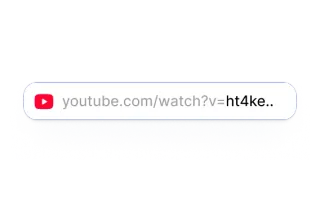
Upload
a videoDrop in a video file: a podcast clip, a talking-head video or phone footage. MP4 and MOV both work.
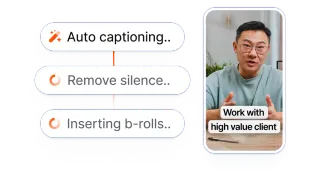
Let AI create
animated captionsAutomatically transcribe your videos, and add animated captions. All done within seconds.
Export and publish
everywhereDownload ready-to-post videos for TikTok, Reels and Shorts: 1080p on Starter, 2K on Pro, up to 4K at 60 fps on Business.


Why use Submagic AI caption generator
Submagic removes the slow, manual parts of caption editing so you can publish more, faster, without sacrificing quality.
Manual captioning
Captioning a video by hand takes a long time and editing skills.
- Type every caption yourself
- Time each line to the audio by hand
- One language. No translation.
- Restyle every video from scratch
It’s repetitive work. Save the time
to create more content instead.
vs
AI animated captions
Upload your video. Customize style.
Get animated captions back in seconds.
- AI generates captions for you
- 98.8% average accuracy. Animated captions
- 118 languages. Translation supported
- No editing skills. Text-based editor
Get captioned video ready in under a minute
Edit by text.
Not by timeline.
Delete a sentence from the transcript. The video cut happens automatically. No timeline, no rendering, no learning curve.
98.8% average accuracy.
For 118 languages.
AI transcribes your audio in seconds, in 118 languages. Fix any word by typing, and translate the captions without a third-party translator.
Animated caption.
Ready in seconds.
Pick from 35+ caption styles that highlight, bounce, and fade with your voice. Upload to publish-ready in under a minute.
Captions vs subtitles, and when to use each
Burned in, built to hold attention
Styled, animated text burned into the video. Captions hold attention on TikTok, Reels, and Shorts, where most people watch with the sound off.
A text track viewers control
A plain text track viewers can turn on or off. Subtitles carry translation and accessibility, and travel as a separate file.
Both from one upload: post an animated captioned clip and still download a clean SRT subtitle file when you need one.
Captions for every kind of video
Short clips are where captions matter most, but most videos need more than a style. Here is what Submagic covers, and where its limits are.
Long videos and podcasts
Each upload can run up to 2 minutes on Starter, 5 on Pro and 30 on Business. For a podcast, webinar or interview, Magic Clips finds the strongest moments and turns them into captioned short clips.
Accessibility
Captions help viewers who are deaf or hard of hearing, and anyone watching on mute. Burned-in captions can't be switched off or read by a screen reader, so also upload the SRT file as a caption track where the platform allows it, such as YouTube.
Accuracy you can check
Average accuracy is 98.8% on clear audio. Music, people talking over each other and loud background noise lower it. Words the AI is less sure of are marked in red, and you fix any of them by typing.
Translation and dubbing
Translate your captions into 38 languages, or dub the voice into 29 with the AI video translator. See the 118 supported languages.
Your brand's style
Save your fonts, colors and caption animation in a Brand Kit, and every new video starts in your style. Agencies can keep one Brand Kit per client.
Subtitle files
Download your captions as an SRT file. Need VTT or plain text? Convert it with the free SRT to VTT and SRT to TXT converters.
Add captions on every platform
Submagic exports captions platform-ready, so each clip fits where it is going without re-cropping.
TikTok and Reels
Vertical exports fit TikTok and Instagram Reels, with safe-zone placement so text never sits under the platform UI.
YouTube
Widescreen exports fit YouTube videos, with captions styled to match your brand.
Square exports fit the LinkedIn feed. Every clip arrives sized to post, no re-cropping needed.
Creators save hours every day with AI caption generator

Make my life easier and faster at editing videos.
You’re upgrading fast and constantly adding new features like music, trimming, and more.

Subtitling is becoming easier and easier.
Submagic is amazing, and the support team is by far the best I've seen from all the apps I'm using before.

My favorite tool for content creation.
The interface is clean, the subtitles are accurate, and it saves me so much time.

Submagic is a massive time-saver, simply a must-have!
It is a monumental time-saver for me every single day. The workflow is extremely well-thought-out.


More caption and subtitle tools
Auto subtitle generator
Generate subtitles for any video and download them as an SRT file.
YouTube subtitle generator
Caption YouTube videos and Shorts, and upload the SRT as a caption track.
AI video translator
Translate captions into 38 languages and dub the voice into 29.
Magic Clips
Turn a long video or podcast into captioned short clips.
Best fonts for subtitles
Which fonts stay readable on a phone screen, and why.
How to add captions in CapCut
A step-by-step guide, and when another tool is faster.
Best caption apps for videos
How the main caption apps compare on styles, languages and price.
Best subtitle apps
Subtitle apps and AI subtitle generators, compared.

Join 4M+ users using AI animated captions
The secret weapon behind viral short-form. Helping creators grow subscribers and boost engagement effortlessly. Use AI caption generator.
Start Captioning My VideosFree- 118 caption languages
- 35+ animated caption styles
Frequently asked questions
Is Submagic's AI caption generator free?
You can try it for free. With a free account you can caption a video, edit the words and the style, and download the SRT subtitle file. Exporting the captioned video needs a paid plan, from $12 a month billed yearly or $19 month to month, and paid exports have no watermark.
What is the best AI caption generator for short-form video?
It depends on the video. Submagic is built for short-form: animated, word-by-word captions in 118 languages, with zooms, B-roll and sound effects in the same editor, so a clip is ready to post without another app. If you need to export videos without paying, or caption videos longer than 30 minutes in one piece, another tool will suit you better.
How accurate is Submagic's AI caption generator?
98.8% on average, on clear audio. On a 300-word video that is about 3 or 4 words to fix. Music, people talking over each other and loud background noise lower it. Words the AI is less sure of are marked in red in the editor, and you fix any word by typing.
Can I download the captions as a subtitle file?
Yes, as an SRT file, the format YouTube, Vimeo and most video players accept. Submagic doesn't export VTT or TXT directly; the free SRT to VTT and SRT to TXT converters on this site turn the SRT into either.
Can Submagic translate videos into multiple languages?
Yes. Submagic transcribes 118 languages and translates captions into 38. To translate the voice too, the AI video translator dubs it into 29 languages. Caption a video in English, then make Spanish, French, Portuguese or German versions without re-recording.
How much does an AI caption generator cost?
Submagic is free to try. Paid plans, billed yearly: Starter $12 a month, Pro $23 and Business + API $41. Month to month they are $19, $39 and $69. The pricing page lists what each plan includes.
Can an AI caption generator add animated captions to TikTok and Reels?
Yes. Submagic includes 35+ animated caption styles that highlight, bounce, and fade in sync with your speech. Exports come platform-ready: 9:16 for TikTok and Instagram Reels, 16:9 for YouTube, 1:1 for LinkedIn. Every style is customizable with your brand fonts and colors through the Brand Kit.
Do AI caption generators work for long-form videos like podcasts?
Up to a point. Each upload can run up to 2 minutes on Starter, 5 on Pro and 30 on Business. For longer videos, the Magic Clips add-on ($12 a month billed yearly, $19 month to month) finds the best moments of a podcast, webinar or interview and turns them into captioned short clips.
Are AI captions good for accessibility?
They help, but burned-in captions aren't enough on their own. They can't be switched off, resized or read by a screen reader. For accessibility, also upload the SRT file as a caption track where the platform allows it, such as YouTube, and check names and technical terms before you publish.
Can I use an AI caption generator for my brand with custom fonts?
Yes. Submagic's Brand Kit lets you upload custom fonts, brand colors, and your logo. Every AI caption you generate uses your visual identity automatically. Agencies can keep a Brand Kit per client, so every video stays on-brand without manual formatting.
How fast can an AI caption generator create subtitles for a video?
Submagic transcribes your video and applies animated captions within seconds of the upload finishing. The text-based editor means no timeline and no manual sync: you change a caption by editing its words.
What is the difference between captions and subtitles?
Captions are styled, animated text burned into the video to keep viewers watching with the sound off. Subtitles are a plain on or off text track used for translation and accessibility. Submagic creates both from one upload.
How long should captions be on screen?
Short. On TikTok, Reels, and Shorts a caption line is on screen for a moment, so Submagic breaks your transcript into short lines timed word by word to your voice. You can adjust line breaks and timing in the text editor before you export.
Can I edit the generated captions?
Yes. Every caption is editable by text: fix a word, change the phrasing, adjust timing, or restyle fonts and colors without touching a timeline. You can save your style so the next video matches automatically.